
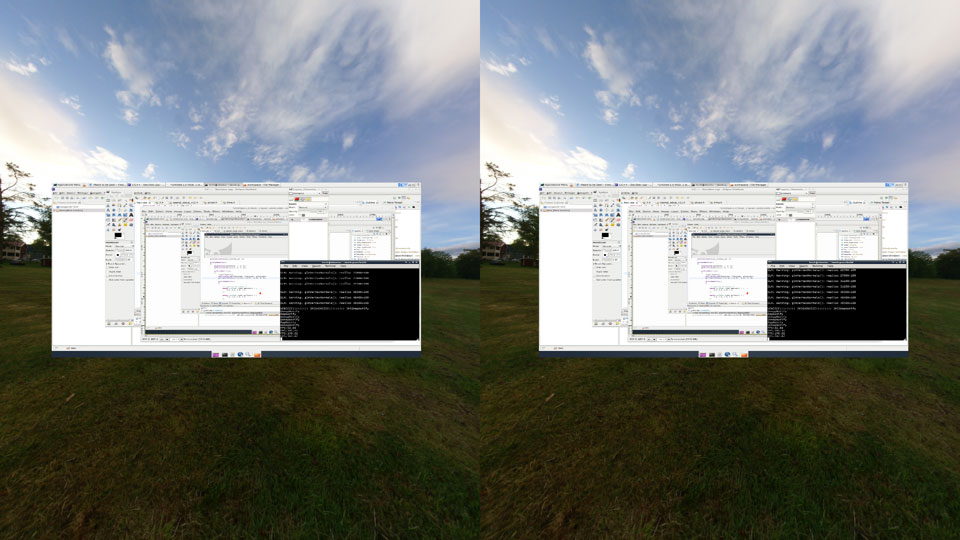
Photo Credit: Hesham Wahba
Ibex
About
I created Ibex as a fun project to get a working virtual reality desktop or workspace for the Oculus Rift when it finally comes out. Currently it runs quite quickly on Mac OS, Windows as well as on Linux both on a virtual machine and on a native Linux Desktop running XFCE with no other compositing windowing manager running. Currently I’m getting around 250fps.
Public GIT repository on my ibex Bitbucket.
Demo Videos and Articles
Videos: Overview of ibex, Closeup of ibex and the ibex Water and Sky Shaders videos. Articles: RoadToVR (1,2), Slashdot, Tech Hive as well as the Mote and Beam blog articles.
Downloads
#####Beta 28 Windows: (Ibex Win Beta, you will need the 32-bit VC++2012 Redistributable, make sure to install the x86, i.e.: 32-bit version), ensure desktop extended not mirrored.
Mac: (link, requires OSX 10.9), ensure desktop extended not mirrored.
#####Previous Mac: Beta 24 (link) Mac: Beta 15 (link)
Launch
Default simple renderer: ./ibex
Fancy Irrlicht renderer with Quake 3 level: ./ibex -i
Simple Ogre3D renderer demo: ./ibex -o
Disable SBS rendering: -m (for mono view not stereo)
Control
Toggle Control Desktop/Move Around World:
             CTRL+SHIFT+G (Windows) / CTRL+SHIFT+Y (Linux) / Fn+Shift+F1 (Mac)
Look: Move Mouse
Move Forward: W
Move Backwards: S
Walk Sideways Left (Strafe Left): A/Q
Walk Sideways Right (Strafe Right): D/E
Run: Shift
Jump: SPACE
Reduce Quality: Fn+Shift+F2 (Mac Only)
Bring up Desktop: Backslash (\, Win and Mac Only)

Help: H
Toggle Ground Layer: G
Show FPS and Information Dialog: / (Mac Only)
Choose movies: Show info dialog with '/' then press 1 or 2 for regular or
       stereo movies, then navigate using arrow keys and enter to select a movie
Adjust IPD for Rift Stereo: -/+
Change Monitor Shape (Mac Only): Q
Toggle Barrel Lens Distort: B
Toggle SBS: B followed by P (Mac Only)
If using the iPhone controller app (source included) you need to connect to the correct IP for your computer in the iPhone app. When you hit “Broadcast” the orientation of the phone becomes the base orientation and you will start looking around from there.
Development Diary
1/20/2014 - Mac and Windows ibex Beta 27 with Retina Mac support as well as a brand new App Launcher. You can access it using the O key. On the Mac it is meant for launching fullscreen applications. It will pause the rendering and head tracking till the app quits then it will pick up right where you left off. To launch apps regularly just use the desktop as usual. For Windows the support for pausing isn’t there yet, but it will be there soon, I just wanted to get something out sooner. Oh, and there is now a configuration app for the Mac to let you drag and drop applications onto it or application folders to help set up your list of apps. On Windows you need to edit the ibex.ini file and add a ; separated list of directories or applications that you want to show up. There is a sample in there to get you started.


Lastly, the Retina support came about funnily enough. My laptop was stolen while on vacation so I had to go buy a new laptop and figured a Retina one would make sense. That exposed the issue with CGDisplayBounds not returning the full retina resolution but the virtual one. To fix it, I had to iterate through the NSScreens instead and get the backingScaleFactor, otherwise taking the screenshots worked fine (need to use the smaller virtual screen bounds) but the texture was all messed up because it needed the full resolution. All good now!
1/10/2014 - Mac and Windows ibex Beta 26 with SBS video support. In addition to SBS video I fixed up the interlaced stereo video support from earlier. It is a bit dizzying watching stereo video in the Rift however, if anyone has any suggestions please let me know. Up close it isn’t too bad but it feels wrong watching these Rift SBS videos as-is. Please let me know of any issues.

1/5/2014 - Mac ibex Beta 25 with multi-monitor support. Surprisingly I found enough time to get this working. I used AirDisplay for the Mac to test it out. Hopefully the performance isn’t too bad. Also, unlike Windows you can use the Rift display as a second monitor as we can take screenshots below the Rift display. I’ve left beta 24 up in case there are any issues using this one. Please let me know if so.

1/3/2014 - Windows ibex Beta 25 with Windows multi-monitor support. Sadly I won’t have enough time to add the Mac multi-monitor support for the next few days.

1/2/2014 - Mac and Windows ibex Beta 24 with fixes for showing the cursor when ibex minimized on the Mac as well as showing static on the video player till something loaded and some tweaks to help and Rift auto-detection of the display by name on Windows.
1/1/2014 - Mac and Windows ibex Beta 23 with universal architecture fixes, video playing, camera viewing fixes.
12/29/2013 - ibex beta 22 fixes a few small things for Windows, mainly that you can now remain fullscreen if you switch windows or hit the Start menu. The other requirement for this to work though is that you extend your desktop not mirror it. The second minor change which affects Windows and Mac is that the OSD text is now no longer stretched so it looks slightly nicer and is easier to read.

12/28/2013 - After lots of changes I finally managed to get almost all the features that were in the previous versions of ibex working in the new and improved renderer. The biggest change I wanted to add in addition to the below is the fact that you can now walk where you are looking. You can turn it off with the U key if you’ll be using a joystick or Razer Hydra to walk (in the future) and want to look around freely without influencing your body’s walking direction. You can also bring up the desktop facing you anywhere using \
First off video is working once more, and better than before it now uses the official VLC installed on your system for the build and getting plugins. Previously one had to do a local build which was a huge hassle, so this is a big win for packaging and stability as there are fewer tweaks that need to be made to update to the latest VLC version.
Secondly, the text renderer finally got some love. It no longer renders a screen that you can look around but instead tries to keep everything within your field of view. Only the video file selection requires scrolling but in the future I’ll add support for scrolling on all the screens to allow more information to fit in. It isn’t perfect, but it works.
Another nice tweak was the addition of a mini feedback screen that pops up and fades out whenever you make a change to a setting so you know what the button you hit does. It pops up for about 1.5 seconds then fades out.
Lastly, a few more tweaks that were requested and small fixes:
- Windows now using OpenGL 3.3+ and ibex should work on Windows XP once again
- Bring up desktop anywhere facing you at \
- Bring up menu anywhere with /
- Unlimited terrain
- Lock head-tracking to last position using L
- Lock walking to where looking or allow free-look U
- depth culling of trees loosened slightly so they don’t pop in and out of view
- help menu using H key
- movie playing is back, regular or stereo


12/11/2013 - Fixed up my lighting including with normal-mapping enabled. Lots of little bugs here and there. The other issue I had is that my normal map had transparency which I didn’t know how to deal with so I flattened it and replaced it with a light blue as most sources seem to have. The lighting matches what it looks like now without the normal map after fixing. Viewing things from the light’s perspective is very instructive and was wrong for the longest time. Also, the position of the light seems to have had a big effect, moving it out from near the center seems to have helped immensely. Performance on my MacbookAir is still a horrible issue though…


12/08/2013 - Relative big update again and beta 20. Visually I still hate how simple everything looks compared to nicer 3D engines that are out there. I still think the ultimate goal is to get ibex in a AAA engine, but till then I will keep playing with my own. Lots to learn about.
First a relatively pretty picture showing off the new features: model loading of a tree that I scatter 500 of around the terrain, gamma correction, shadow mapping, normal (bump) mapping so that the ground isn’t so smooth anymore, caustics under the water and reflection of the skybox in the water.

What I’ve done this time is added support for the following, though much needs cleaning up and fixing:
- Normal mapping: this is used on the terrain so that the textures are bump-mapped and not just flat. It gives the grass and stone a bit more of a 3D look as the light bounces off of it.
- Model loading using Assimp based on the tutorial from Lighthouse3D on model loading using Assimp. This is really cool because it opens up a whole world of 3DS and Collada files for loading. For now I only load up a tree but in the future I’ll see if I can’t get more interesting things loaded up. The model leading needs much more cleaning up but once it is done I can start adding collision detection, frustum culling so that we don’t render more models than we need and Octree support both for culling, collision detection, and possibly for occlusion mapping.
- Fixed up the directional lighting and normal generating for the terrain. Not 100% certain that it works but it looks decent for now.
- Shadow mapping was updated to include the trees. I’ve also figured out an amusing bug in that if your light is very steep then the shadows will “bleed” through the hills to the other side. I couldn’t figure out why my shadows weren’t just hitting the first surface. I guess this makes sense and if I were shadowmapping the terrain it would probably work correctly. It should be interesting dealing with lighting once we have buildings and indoors to deal with. I also took an opportunity to ensure that ambient lighting truly is as dark as it gets, previously I was multiplying it by the shadow pass but that isn’t quite right.
- Gamma correction: as mentioned in this article by Larry Gitz and Eugene d’Eon - The Importance of Being Linear. This basically corrects for the fact that our monitors and displays have a non-linear response to brightness and so we need to correct our results so that we don’t end up with the middle of our range looking either too dark or too bright, but rather a smooth continuum as expected. I had ro use GL_SRGB on the final framebuffer that was used for displaying to the screen to hopefully get the effect right.
12/01/2013 - Just finished adding the caustic effects to the water. That mimics the way light rays reflect off the bottom of ponds and lakes by creating these nice shifting light effects. I also added the ability to reduce the quality of your rendering with Fn+Shift+F2. You can now jump by pressing the space bar. Also, a convenience, you can now bring up the virtual desktop anywhere in the world using the backslash ‘' key. Obligatory screenshots and beta 19:


11/29/2013 - Beta 18 for the Mac needed to arrive now that there is pretty water! Get it here. Here is a video of what’s new:
Water with skybox reflections is finally in. The shader was a bit hairy because despite what I was reading online and in books no matter what I did whenever the player would walk around the skybox would end up stretching and skewing in an unusual fashion, but at the center it was always clean. That’s when it became clear that for the fake reflection I was doing the water plane needed to shift with the camera so that it would always reflect the skybox properly. This ofcourse interacted interestingly with the perlin noise shader for distorting the surface normals to make the reflections more interesting. The solution was to transform the shader with the opposite of the real world player coordinates (x and z only) and suddenly you have a shader that looks solid and unmoving despite the entire plane moving along! Here are some nice screenshots to show the effect.


11/27/2013 - The new feature is finally here and along with it beta 17! Get it here. Shadow mapping is now working for ibex on the Mac. There are some inconsistencies between the light that’s used to light the scene and the light that’s used to generate the shadow map however it is finally getting there. Below is a screenshot showing this progress. I tried rotating the screen about it’s axis and the shadow rotates nicely around as well. After this I’ll try to get more interesting shapes as well as start self-shadowing the ground. That currently isn’t working as far as I can tell. One solution is to add a depth for each object not just have flat surfaces, then it should work. I have some nice ideas on what to work on next.
Oh, and a nice new optimization that opens the way for better support of non-rectangular projections of the display is that I finally render the mouse in the desktop texture and cleaned up a texture leak that was caused by the old way of capturing the mouse. Now at least if I render the texture on a cylinder or sphere it will draw the mouse on there and I won’t have to figure out a way to properly scale and transform the mouse to fit that new projection. That was actually quite broken in the pre-OpenGL 3.3 ibex. I’ll work on adding back the other display shapes soon.
More hopefully to come!

11/26/2013 - Small optimizations like rendering the cursor as part of the desktop texture on the Mac and fixing a texture leak for the cursor. Cleaned up more code and organizing better for more features. Also fixed the cmake build for the Mac so the latest branhc builds. I’ve heard there are issues installing OpenCV on OSX 10.9 through brew. If you downgrade to the OS 10.8 SDK either by using xcode-select to choose it or by installing an older XCode you can probably get around this.
I’ve also started working on a nice new graphical feature that can be seen in the source checkins but I won’t mention it here just yet.
11/24/2013 - After a bit of playing around I added a flag and replaced the cubemapped skybox with a regular old cube and skybox textures on every face. Kindof annoying to have to do that but at least it renders right.
Also, for fun, I’ve added per-pixel lighting finally. Everything is a bit dark but there is a spotlight and specular highlighting at the very least. After a few more features I want to add I’ll start tuning the lighting to look nicer. Anyways, here’s a screenshot of the latest progress!

11/24/2013 - Huge update finally. I discovered why my code kept falling back to the OpenGL 2.x Profile on the Mac and fixed that. Now the published source has been updated to only use OpenGL 3.3+ on the Mac. This probably breaks the Linux and Windows builds and will also mean that you will need a relatively recent video card. Macs from 2011 onwards should be supported as well as some of the older Pro laptops that had discrete video cards.
The benefits of this move are that I can finally start writing modern shader code and take full advantage of the video cards that are coming out today. Also, performance has never been that hot on older hardware to begin with so this just formalizes the minimal requirements needed.
Finally, a screenshot of the OpenGL 3.3 version of Ibex on the Mac! Interestingly enough there seems to be a driver bug on my machine for which I’ve filed a bug report with Apple that causes cubemaps to render random textures rather than the correctly bound ones. It might yet still be a bug in my code but for now I’ll update the code shortly to just render a cube manually with all 6 faces by hand.

11/22/2013 - Beta 16 of Ibex for the Mac has been released. Since it has been so long since the last beta I’ve decided to keep the previous one up as well. Please let me know if you have trouble running it. It requires OSX 10.9 Mavericks at a minimum which Apple has made as a free upgrade for all machines since 2007. You can find it at:
Mac - Beta 16 (link, requires OSX 10.9)
Previous Mac Beta - Beta 15 (link)
I’m working on some new features that will hopefully be of interest now that this change is out. A long time between new features and coding is always disheartening and it takes a while to get back.
11/21/2013 - Started work on re-adding caching of the distortion shader. Currently it works but it is overlapping one of the lenses in the middle. It doesn’t add much in terms of performance, but going from 30fps to 35-39fps is still a relatively significant change on slower hardware. The biggest problem was figuring out how to do the caching.
The solution I ended up using involves setting up two different render targets on my framebuffer object (FBO) in the OpenGL GLSL shader. Once I did that I render the coordinates of each color: Red, Green and Blue to gl_FragData[0/1]. I use the value of vec2(0,0) for red to signify that we should render black in the final distortion. I used a GL_RGBA32F and I can’t tell the difference between that and the GL_RGBA16F in terms of quality, but I’ll leave it this way for now. Below is a screenshot of the overlap problem.

11/19/2013 - Today I finally fully integrated the Oculus 0.25 SDK with ibex on the Mac. Ibex now fully respects and applies your calibrated profile. This means the IPD you set and use in your other applications will now ‘just work’ in ibex. Text is much sharper and it feels much smoother and more natural using ibex now, everything feels even more solid than before!
Performance is slower than the older version because there is no caching possible on the distortion shader, or at least not full caching. To store all the pairs of cached data would take too long, but I might try using an array and read from there in a future update.
11/17/2013 - Checked in update for the Mac version to support the Chromatic Aberration parameters provided by the Rift. This should make the view a bit sharper and more readable, especially once the HD Rift comes out.
An update on what else I’ve been doing for ibex. I’ve written two different plugins to share your desktop, one for Unity3D and one for Cryengine 3 using their free SDK. These both fit in with my goal of eventually running ibex on a AAA engine so that you are immersed in the most beautiful world possible. There are numerous issues getting them to work though.
The Unity plugin for the Mac works up to the point of getting you your desktop integrated in a beautiful world, however due to the way it captures the desktop I haven’t found a single way to pass the mouse input through or keyboard so you can interact with the Desktop. This is a shame since this version also supports seeing your hands using the Razer Hydra and would have allowed interacting with the world this way.
The Cryengine plugin is the most beautiful of them but it too has its own issues. First off, it is Windows-only and requires a very powerful graphics card. On the flip-side it offers a graphics experience parallel to none. Instantly rendering gorgeous trees with shadows, clouds and flowing rivers as and a beautiful ocean. They also offer a slew of critters to drop in so you can have frogs hopping about and Eagles soaring overhead. The only drawback is that after getting everything rendering through their Engine I discovered that they were a little bit too trigger-happy announcing their Rift support. In short, it doesn’t work. Someone on their end must have gotten it working and they announced support, but as it stands not I nor anyone else on their forums has been successful at getting it to work sadly. It is a shame since that is a truly gorgeous experience!
UDK turned out to be a dead-end, they have no support for replacing textures or accessing the underlying windows so you can do anything below the level of their scripting language. UDK does look great and for another project I played around with it would have been awesome, but sadly it is not for ibex. My only hope is that once they release UDK 4 at some distant point in the future their C++ support will expose much more than purely shaders and strictly game-related functionality.
9/9/2013 - Wow! Its been over a year on this project :)
Updated the Ogre support on the Mac build to 1.9. There is a very insidious bug in the latest version, make sure that if you are using an external NSView with Ogre to convert the Window ID to an Ogre::String rather than an std::string as that no longer works. Other than that it is working again and the next step is to integrate head tracking and share code with the rest of the codebase.
The past few weeks have been spent cleaning up the build system and preparing to merge the Windows, Linux and Mac source trees. The code is now the same between all of them except for one or two small things. The Linux and Mac cmake builds are the closest to being the same. Once they are I’ll work on the Windows one. There have been some nice instances of deleting code and making it a bit more robust as generally happens when sharing the same codebase across operating systems. Some interesting gotchas as well, though not sure how many of them will translate well across other projects. In any case, I’m hoping that this Ogre integration works well.
Oh! The biggest holdup was a crash I couldn’t track down no matter how many times I rebuilt Ogre and its dependencies and everything on my system with homebrew and it turned out that the culprit was the Sixense Hydra library being linked against the old stdlib and crashing in Boost whenever I tried to use it with C++11 and libc++. It was a huge pain to track down but now I disable the sixense library when running the Ogre build.


8/23/2013 - Fixed up the Windows version of ibex and released a new beta. It now uses VLC for playing!
8/22/2013 - The OSX port to using cmake is now complete with a new beta. It builds including VLC as well as packing up the icons and everything. It needs to be built using “sudo cmake install” and can be found in /usr/local/ibex.app when built. You can change the installation directory using cmake variables so you don’t need sudo permissions. I haven’t tested that yet but I will when merging with the Linux version. I have updated the beta for Mac finally and it requires OSX 10.8 minimum for now. I will try to build and test on 10.7 at some point but no guarantees! Don’t forget to test out the new monitor shapes by pressing Q when in Ibex mode.
More work on a single code-base for all 3 operating systems is in progress. The Windows updates are next followed by a final merge with Linux and Mac to a unified build and packaging system!
8/18/2013 - Finally managed to get the Mac version of ibex to build fully using cmake and run including the VLC component! Next up I need to merge the Linux and Mac versions of the cmake files so that they build from the same source tree. After that I’ll work on the Windows build so I can have a fully unified build system! This will allow for much faster iteration and adding of features.
8/3/2013 - Much more focus on the Linux version. I still can’t get compositing working on the Rift on Linux, however I can get it to detect and run on the Rift if I update the SDK to disable the use of Xinerama if it isn’t enabled. You can now head track with predictive head tracking as well as watch movies. This is the first version with VLC support which I will add to the other OS’s soon. This is much smoother and has perfect sound reproduction. There is some code cleanup needed to remove the dependency on Linux and share the same file across OS’s but it will be pretty easy and the results are really nice. After that there needs to be some sort of plugin system so others can integrate, but that will take time.
7/28/2013 - Linux version updated and nearly feature-complete with Mac and Windows versions, work on unifying codebase using cmake and auto-generated projects. It doesn’t choose the Rift display yet but already pulls orientation using the Rift sensor and has nearly all the features using the same codebase as the Windows and Mac versions. Very soon the codebase will be unified and built from the same source directory with no duplication! A very long time coming :)
5/20/2013 - Fixed up the spherical display and added a new cylindrical display. You can toggle them on the Mac version using the Q key. You can also disable barrel distortion using the B key followed by the P key t o disable side-by-side rendering. Right now changing the shape of the display has highlighted an issue with the cursor code: namely that because the textures aren’t composited and I render the cursor later, it isn’t warped the same as the desktop and looks weird. That will need fixing too. Other than that it is interesting and easier to read in the Spherical display or the Cylindrical display even though they aren’t quite optimized for viewing and are so large that you have to look quite a bit using your head to see clearly. I will tweak it and let it be a user configurable parameter. Below are some comparison shots. They are hard to see because of the barrel distortion but still highlight the difference in shape and readability. I’ve updated the Mac beta for now to fix a mouse cursor bug as well.


5/19/2013 - Added spherical display to Mac version. Will test on a Rift soon and then release a new beta for the Mac and Windows to see if this is any better. Will try adding a cylindrical version as well.
5/18/2013 - Over the past week I’ve been cleaning up the video playing support on Windows as well as cleaning up the project: removing cruft, merging in changes from the Mac version, and making the build more reliable and configurable. Video playing on Windows using ffmpeg is difficult compared to OSX because the Audio API’s are completely fragmented and the one API that is available from Vista onwards without installing extra software, WASAPI, is a horrible pain to use. After adding support for XAudio2 which is much easier to use I found out that it was Windows 8-only or you’d have to have a special build against an older DirectX SDK and have the users install that. There are already far too many dependencies for Ibex as it is, both for building and running. Audio plays choppily, and the video isn’t as smooth as on the Mac but I’m sure it will get there. I’ve also fixed up the Razer Hydra support so that I’m getting ready to try to do more interesting things with it. You can now use the Hydra on Windows and the Mac, just press the LT then RT buttons on your Hydra and after that you can use the thumb sticks to look around and walk. It is also nice that the Hydra supports hot-plugging so you can connect your Hydra at any time to play around with it. Further pain was caused by an update to the Oculus SDK so that it now no longer tells you which display the Rift is and the DesktopX and DesktopY coordinates for it’s top left corner. Lots of ugly Win32 code was added and I eventually find the display based on its resolution not name. I’ve updated the Mac and Windows beta’s on the site if you want to try out the new functionality. Next up I’m hoping to add a curved display and possibly better Hydra usage. Everything is now updated on bitbucket.
5/11/2013 - Windows Ibex can now play videos. Fixed an issue where I was decrementing an iterator after having deleted it. OSX didn’t complain but fortunately VS2012 did. Audio is still not working nor ready in the Windows version and that’s what I’m working on now. Should be done in the next few days I hope. Sucks that there is no good cross platform sound API.
5/10/2013 - Picked up on the Windows code, refreshed and decided to just do it. #ifdef’ed out the OpenAL code until I find a good alternative for Windows from the 5-8 official solutions that have sprouted up in the past 10 years. Got the menu and file browsing code working and the video player ported over. Fortunately the wonderful site http://ffmpeg.zeranoe.com came to the rescue! Instructions are on bitbucket but you’ll need to download the prebuilt libraries and dev packages to get ibex to build now. The good news is the player should work now. I’ve added all the key codes from glut to navigate the windows and all that remains is to spawn off a video playing thread! Hooray!
5/9/2013 - Start work on porting the video code to Windows. Discovered the sorry state of OpenAL not existing and the lack of POSIX compliance means that directory code needs to be completely rewritten for loading and browsing files. ffmpeg is very hard to find pre-built to link. I’m done for the night.
5/8/2013 - The Mac version of Ibex now has a file chooser for movies. You can only choose to play one at the moment and if you want another you must quit and restart, but that will be fixed in time. It was interesting developing a simple dialog system and file chooser for watching movies. Very rudimentary but it will work on all platforms supported by ibex and is functional. As I add more I’ll make it more configurable, but for now it needs to be very simple. Here are some screenshots for your viewing pleasure.


5/6/2013 - Finally got the video support integrated for the Mac and video and audio playing and syncing though not syncing together. Its been very painful working with the ffmpeg libraries and though the sample programs do work, understanding how they work even with the help of tutorials isn’t particularly easy unfortunately. For example on of my videos can play the video nicely, but if I put in the proper delays for video frames it ends up choking on some of the audio, though everything is generally in sync. Stereo video playing is also supported in interleaved format. There is no UI yet for choosing videos however, everything is hardcoded. An FPS display and informational dialog has been added, just press ‘/’ when in ibex control mode to bring it up. This is where more information will be added and a file chooser and so on. I’ve looked at a number of OpenGL GUI frameworks like nui3, CEGUI and a few others but none of them are simple drop-in codebases and require lots of dependencies to be compiled on the Mac and Windows, so I’ll hold off on a decision till I can find something simple enough or roll my own.
4/29/2013 - Started integrating support for ffmpeg in Ibex so that we can start playing videos or movies directly in your virtual environment. Virtual movie theaters here we come :)


4/27/2013 - Ibex for Mac has been updated to support the Rift SDK and full head-tracking! You can now run with or without the Rift and it will mirror your primary display to the virtual world! Performance is also back to 60fps on a Mid-2011 MacBook Air.

4/21/2013 - Improved framerate slightly on Windows by about 30fps (to 280fps instead of 250fps) and reduced latency. Merged code with Mac version for better performance.
4/20/2013 - Fixed the Windows version to no longer fail to run with Aero disabled. It should probably work on Windows XP and higher, but certainly Vista and higher. One less thing to worry about! The problem was with the WS_EX_LAYERED setting on the window. If you set it then you need to have SetLayeredWindowAttributes called after SetWindowLong for the window to show up otherwise it is the blankness that you all saw. I’ve actually disabled it for now as not sure which has better performance, with or without, but either way Aero and non-Aero should work now! Beta has been updated to version beta-4.
4/18/2013 - ibex for the Mac finally runs at nearly the 60fps that it did before. Updated binary so you can test it with your Rifts! It will detect them but can’t do head-tracking as the SDK isn’t available for the Mac yet. The shader was updated to cache the lens distortion factors and only update the cache if the parameters change. It is much faster now and hopefully I’ll port this over to the Windows version soon.


4/15/2013 - Reverted latest optimization, misread the documentation due to a browser rendering issue. Unfortunately Mac performance is back to 30fps on my MBA. Next up will have to be caching the distortion so that we can just look up the values whenever the distortion parameters fail rather than recalculate on the fly as that should yield better performance.
4/14/2013 - Released beta 6 of the Mac version of ibex. Detect which display is the Rift on the Mac and run fullscreen on that display so if you have a Rift you can try it out now but use the keyboard (or Hydra) for navigation! Now all that remains is the SDK to work on the Mac for the orientation tracking. Performance is now 30fps instead of the 60fps it was before. I will need to figure out if the new shader is just that much more demanding or if it is something else. Update: bumped performance on my laptop to 35fps, still more work needed.
4/13/2013 - Merged in some of the Windows code to the Mac branch to help unify them and now the Mac simple world ibex renderer is Rift-ready. Some #ifdefs need to be removed and it will ‘just-work’ with the Rift!
4/13/2013 - Updated the ibex binary. Hopefully it will work now for most users. You may need to install the Visual C++ 2012 Runtime though from here. I’ve also updated it to be resolution independent from the current Rift so that it can pick up the new parameters as they show up in newer Rifts without changing the code. Surprisingly I found that the desktop was completely useable comfortably at 1280x800 on the actual virtualized desktop and you can use it to browse the web or get work done. The best part is that as the Rift gets better this will only get sharper and better as well!
4/12/2013 - The link for the Ibex VR Desktop Beta for Windows is up! Download now and let me know how it works for you on your Rift or if you need any special libraries to be installed like the MSVC++ Runtime or something. I don’t think I linked everything statically. (Ibex Win Beta)


4/12/2013 - The Ibex virtual reality desktop is now working on the Rift on Windows! It took 3 days of work and much appreciated help from the MTBS3D community but it finally works! I probably should have taken screenshots on the Rift itself but maybe in the next update. It was an interesting task. Turns out that rendering in SBS stereo is different than rendering in 3D for a monitor. Oddly, because everything is focused at infinity, you don’t need to shift the rendered images to adjust for the IPD but rather just adjust the IPD purely in the camera translation. Future updates should add Ogre3D support and try to improve performance. I will say one thing about readability: you can’t really read at this resolution unless very close to the virtual display to the point that it is very uncomfortable to read. Multiple virtual monitors with the DPI turned down might help one to be productive. Even bumping the resolution to 2560x1600 on the Rift won’t do much for viewing distance. We might be able to be twice as far in the virtual world which will help for sure but I still think smaller displays will help. I will post binaries up soon for Windows beta testing. The source is on my Bitbucket.


3/23/2013 - Finally got the textures to load on ibex Ogre for Mac. Next up Windows.
3/20/2013 - After much pain ibex for Mac now supports the Ogre plugin. I’ve started working on integrating the Bullet physics engine, but got sidetracked getting Ogre working first so there are interesting things to play around with. I’ve also added support for the sixense joystick. You’ll need to have the SDK installed and update Xcode to point to its location. Same thing, Ogre SDK 1.8.1 if you build the IbexMacOgre target. Currently the water isn’t rendering but everything else is. This should be a good segue to getting the same thing for Windows done so I’m ready for the Rift SDK. When starting if using sixense you need to point your controllers at the base and shoot the left then right triggers. After that you can use the right thumbstick for walking. I need to clean up the code a bit to make some things optional but for now it needs the sixense SDK and Bullet library to build. The code is on bitbucket. Also, the desktop texture needs fixing, it is currently rendering the mouse cursor.

2/10/2013 - Made some decent progress moving the desktop capture to a separate thread. Performance is much better. The VR world is running full speed on my desktop (118fps without v-sync) and the captured desktop isn’t all that bad either right now. Will work on more features as time goes on. Everything is open-sourced and available in bitbucket online right now in the IbexWin directory.
2/8/2013 - Painfully but eventually got the Windows version started. It is incomplete at the moment but it will eventually get there. I’m brute-forcing it and unlike the Mac and Linux versions I can’t exclude the Ibex window from being included as part of the screenshot. I’ll update it and multithread it like the Mac version so that the screenshots happen on a separate thread and don’t reduce the framerate of ibex directly. If ibex is to ever need full performance on OSX or Windows one option that I don’t have the time to pursue right now is a custom driver so it can act much like VNC or RemoteDesktop and capture the desktop at the lowest level. At that point I’ll have a texture quickly, not need screenshots and can ignore what needs to be ignored. Right now this isn’t a huge deal because we’ll be using ibex on a second screen anyways. The virtual display driver might ultimately be needed to get larger virtual desktops out there despite my best efforts to avoid it. While my desktop is around 6 years old now, it does have a quad core chip, 8GB of RAM and a GTX480 which is probably still more powerful than most laptop cards out today and has a lot of VRAM. Hopefully performance will still be acceptable using the brute-force method even on less powerful integrated Intel chips and so on. Only time will tell!
For the technically inclined, I’m capturing the desktop using the standard Win32 API and not using DirectX. The latest Direct3D seems to have removed the FrontBuffer command and it is extremely difficult to get a good app set up quickly in DirectX relative to OpenGL. Again, once I clean up the code I will post it on bitbucket. The only thing remaining at the moment is an actual Rift so I can integrate the head-tracking. In the meantime I’ll work on getting the Windows version up to feature parity with the Mac and Linux ones.

1/20/2013 - Mac Source for Ibex has been released on bitbucket. Please have at it :) I will clean it up and merge it further with the original source, but currently it is an IbexMac Xcode project and an IbexMac subdirectory.
1/12/2013 - Sped up mouse motion on Mac to be much smoother. Now when rendering locked to 60 fps and using mouse on my MacBook Air I get silky smooth motion. I had a bug that was causing me to drop mouse delta motions so it was very choppy. Basically whenever a frame was rendering I would drop the motions that took place in that time, so for (renderTime*FPS)/1second I was ignoring motions which surprisingly turned out to be quite significant. I’ve also updated to use a lock so we can sleep the desktop capture thread and not ‘overdraw’ the texture and waste CPU, so now whenever we are done rendering a single frame I signal the capture function to run. Here is the latest update (beta 5).
1/10/2013 - Memory corruption issues and fix seems to be adding switch to context and glFlush() in strategic places might help memory issues. I wonder if this is a driver issue or an issue on my side. NSZombie detection came up with nothing. Here is the latest update (beta 4).
1/8/2013 - Looks like NSCursor.currentSystemCursor actually leaks by caching the cursor image every call! I don’t know how to fix it but I filed a radar and will see what comes back. In any case, that and another hack to hide the cursor even from the background make it slightly nicer since you only get the cursor in Ibex. Again, this won’t be a big deal once the Rift is out as we’ll be using two displays, one for the desktop and one on the Rift so the cursor can show on the main display and we’ll render it fine on the Rift. Also, I’m not sure why its no longer running at 60fps… in any case, here is the latest update.
1/7/2013 - Updated Mac version of Ibex to be locked to vertical sync and it now runs at a smooth 60fps. The trick is that taking screenshots of the desktop for compositing and uploading to a texture takes place on a secondary thread and the data is shared with the main context. That way on a dual core CPU we aren’t slowing down the rendering thread yet we can still get the desktop as fast as possible. For some reason this is slightly choppier than in beta 1 for the desktop, but ultra-smooth otherwise. It remains to be seen how this works on the Rift itself when we enable dual monitors! The download link is here.
1/4/2013 - I finally got the first beta release ready for the Mac. It requires OS X 10.8. I hope this works for most users. It currently works on only a single monitor. You can move around using the keyboard commands above. To switch between desktop control and virtual world control press Fn+Shift+F1. I’ve increased the size of the barrel distortion shader to fill the screen so it will be more readable on the Rift hopefully. You can use the open source iPhone app to simulate a motion sensor if you have an iPhone developer account using the source on bitbucket above. I will try to get a binary out on the App Store once Ibex is more stable and officially released. I hope you enjoy and please feel free to send me feedback. The download link is here.
1/3/2013 - It’s been a while, side-tracked by many other projects. In any case, Ibex for the Mac has been a rather fun diversion which I will try to get a download for up soon enough. I got rid of some of the open-source library dependencies that I had for the Mac, though for Linux they remain. Currently it only does the ‘classic’ mode which I think is cleanest in any case. It took a long while but even with brute-force graphics processing it is running at a very reasonable speed on my MacBook Air. It is surprising that some things just worked with no changes like the iPhone orientation tracker (though I want to upgrade that to use bonjour) and the OpenGL barrel distortion code, while others took a bit more wrangling. I got rid of much of the code that was in the Linux version. There are also some frustrations like not being able to completely hide the cursor. The good news is we can at least have the cursor on the main monitor in which case it will not render on the virtual world and only the virtual cursor will, though when testing on a single monitor the cursor will unfortunately appear.
Other complications arise from not being able to do proper compositing, so you have the cursor issue, the problem that Ibex is an app so I have to prevent switching to other apps when controlling Ibex but allow switching when in desktop mode. It is also much slower than getting a single texture straight from the system yet it is still smooth enough to work on.
It took about two weeks of on-and-off programming to pull off the port but it has huge potential I think with more users. A Windows version should follow at some point I hope.
I’m also interested in adding a widget or plugin API so that running apps can enhance Ibex and add things to the virtual world without being hardcoded into it. Time will tell.


10/23/2012 - Being helped by NVidia to test a crash on startup. Seems that during the mode switch on my monitor from 120Hz to 100Hz it is crashing. It may be fixed in the latest drivers but will have to wait till I can test to find out. Haven’t been helped by anyone at xorg-devel related to my bug with Xrandr where I can’t disable panning on my version, it just fails with some X error. I can change the virtual desktop size but it is useless of it pans.
10/18/2012 - The past couple of days have seen me take a step back to work on getting the virtual desktop to run at an actual larger size than the monitor resolution. I’ve been using Xrandr to get that done but it hasn’t been too successful on my system so far. I made changes to support rendering the higher resolutions however I’m running into issues where the desktop pans and pushes my 3D view off to the side when I got past the physical resolution with my mouse. There needs to be a way to disable that. Once that’s done I can get back to other fun things.
10/16/2012 - Got barrel distort and side-by-side (SBS) rendering working on Ibex for the Ogre 3D plugin. It was relatively painless, reused shader code with slight modifications, will try to get down to single source for all programs to share that instead of copying and pasting everywhere. The world is beginning to shape up. Performance dropped from 600fps on my desktop to 350fps, so there is definitely a toll. I have some ideas on how to speed things up, but not just yet. I think I might need to tweak the texture settings, and lower to the Rift’s resolution, FOV is all wrong on this as well due to how Ogre works, hopefully that can be fixed. Also, I don’t have a way of toggling the barrel distort off yet. Looking forward to adding the neck rotation model, improving text sharpness, zooming in on texture so no wasted space on edges as can be seen.

10/15/2012 - More playing around. Water effects improved and learned how to create stenciled layers to blend on layer of terrain textures into another and create a path for example.

10/14/2012 - Some breakthroughs in my learning of the Ogre3D engine finally. I might end up trying to make a game with it at some point :) In any case, it can now load models from Blender exported with the Blender2Ogre export scripts and the dotScene file format for Ogre. It was quite hard figuring out how to get materials and textures just right as well as UV mapping. I need to look into pre-baking the textures which should make it cleaner and easier than what I’ve done so far. I’m fairly pleased with the basic results. Fixed the display proportions, got occlusion working for the desktop, added a skydome, the iPhone orientation sensor works and you can fly around the landscape with your mouse and the usual WASD keys. I still need to add terrain collision and other things but it is a great start I hope. Oh yeah, and next step is rendering the two SBS views with the shaders working, that should be interesting.


10/8/2012 - Development hasn’t slowed down, I’ve just been stuck getting to the next level. I’ve failed to get the Irrlicht plugin to work on my NVidia desktop, it only renders white. If anyone has any suggestions I’d love to hear them. In the meantime, I’ve returned to what I thought was a dead end and fixed up the Ogre3D plugin. It now requires the Ogre 1.8.0 package to be installed for it to even build or run and one needs to check the configuration file and source to get it to point to the right paths. Still, it now works when it didn’t before and I have a fully interactive desktop on a spinning cube and a green Ogre in the back! The key thing is that this runs on my desktop as well so it is a rich platform for some powerful effects and loaders from Blender and other sources. Really excited about the possibilities.

10/2/2012 - Shaders and barrel distortion working properly now and respects the toggle key on the Irrlicht plugin! Took a week to get but finally works. Its annoying working with an engine and conventions you didn’t write yourself but at least it helps reduce your workload!

10/1/2012 - After a long while bugging me I finally figured out why the desktop was rendering only a portion to texture when changing the native resolution lower. Turns out glViewport needed to be set so that I could render to a larger texture than what the native resolution is otherwise it would get restricted. Moment of inspiration 1-liner while napping before work is all I have to show for this weekend.
9/27/2012 - Failed at getting the GLSL distortion shaders working on the Irrlicht plugin. I settled for adding a mono view (-m) flag to disable SBS rendering and plugging in the orientation code so the iPhone works as an orientation sensor for the Irrlicht plugin as well.
9/26/2012 - Finally got side-by-side (SBS) rendering for the Irrlicht plugin for ibex. That is now the default when running though I’ll add a flag to run in non-SBS mode as well for testing purposes.

9/25/2012 - Code finally cleaned up and modularized and conditionally compiled/enabled using cake and find scripts and everything… only problem? It seems to hang on start as usual on my NVidia desktop. The regular mode runs fine just the irrlicht mode that hangs… will figure it out soon I hope. Still, a huge step I think.
9/24/2012 - Irrlicht integration finally works with movement and collision detection! Article about Ibex on RoadToVR as well as the Mote and Beam blog! Here is a screenshot of the desktop from a distance. The next steps are code cleanup.

9/23/2012 - Spent the past few days working on getting the Irrlicht engine integrated instead of Ogre3D. I’ve reached a point where I can render a scene and have a virtual desktop appear in it. It has been rather difficult getting to this point but I think that it will get better from here. Moving windows works, moving through the world doesn’t just yet. It is definitely helping me think through my interfaces a bit better. I’m sure this will present some issues for me when it comes to rendering SBS views unfortunately the way that I render to texture, etc… but we’ll see. Hopefully I can get a screenshot up soon.
Update: screenshot using Irrlicht engine as a plugin and rendering the full interactive desktop :) Still not sure how I’ll get SBS rendering done but at least this gives me a good idea of how the video code needs to be abstracted for use by plugins.

9/18/2012 - Finally after much trying I’ve gotten Ogre 3D to interface with my existing window. Here is my first bit of progress, their demo ogre! It isn’t quite a plugin just yet though.

9/17/2012 - Spent a few hours trying to integrate the Irrichlet 3D engine as a plugin to ibex but failed. There are some issues interfacing it with existing windows and OpenGL contexts which is what I want to reuse for our existing work so it can integrate better. Started looking at Ogre 3D but haven’t gotten anywhere tonight. ** **9/16/2012 - Improved barrel distort to be much more readable and to be asymmetric so you can distort the x or y axes more. Original reference was from (barrel-distortion) but my latest formula is based off of (paulbourke lenscorrection).

9/15/2012 - Added a ground layer and fixed the left/right eye translation so the 3D doesn’t look terrible. Added a trial ground layer and translated everything up by 1.5 meters so the scale looks reasonable. Need to figure out how to make this more interesting.
9/14/2012 - Second pass at barrel distortion, it works :) I’m not sure about the formula and it assumes uniform distortion so may not be 100% correct, we’ll see. Press B to enable when in navigation mode.

9/13/2012 - First pass at barrel distortion in Ibex to prepare for the Rift, looks awesome even though it isn’t quite there obviously

9/12/2012 - Created some YouTube videos demonstrating the current state of Ibex embedded below.
Overview of Ibex from a distance:
Closeup of the desktop:
9/11/2012 - Got the orientation working through the iPhone! I’ve been trying to test out orientation somehow so I can get a feel for what the virtual desktop might feel like and react on the Rift, we’ll see how this goes! Currently it is a simple app hardcoded to broadcast to the laptop VM’s IP as UDP, but I’ll improve it later. Also, it seems that I needed to invert the orientation to get what I expected, problem is the CATransform3DInvert was very flaky so I did the inverse of the motion on the compositor’s listening side.
Thanks to NickK from MTBS forums I fixed the regression where windows weren’t moving, that’s due to the hotspot optimization I made. I now remap windows if they move as well now. I’ve also added the iPhone orientation app to the repository so others can work on it too if they need to. I want to start cleaning up so I can make it more modular and plugin-based… not yet though.

9/10/2012 - Started work on the orientation code finally. Problem is my Wii controllers won’t work on my virtual machine b/c Parallels doesn’t have a bluetooth driver for Linux. So, I decided to write a simple app for the iPhone that simply sends an orientation matrix through UDP to a particular host/port. Not quite done though… sigh.
9/9/2012 - Based on suggestions from NickK and LeeN from the MTBS forums I fixed some simple memory leaks and profiling hotspots. Wanted to work on orientation and other issues but didn’t get much of a chance. Looked up the wikipedia article on Barrel Distortion correction so I could prepare to undo the lens distortion of the Rift. Pretty good read: Distortion Optics.
9/7/2012 - Success! I finally managed to capture the mouse cursor image and render it properly. Now you can mouse-over links or windows and it will render correctly. The only thing missing right now is to implement the hotspot for where the actual focus is, currently it is slightly off.

9/6/2012 - Started work on using Xfixes to capture the mouse cursor image and try to render it in OpenGL properly. Failed.
9/5/2012 - Managed to capture more MapNotify/UnmapNotify events for some windows so that at least terminal tab creation/destruction and others don’t lock up. Problem is still menus have stale pixmaps which are the first ones that get mapped first time they are displayed
9/4/2012 - Added option to render desktop Orthographically to texture or to render the old way which is draw the desktop twice to the screen with perspective. This improved the framerate to 250fps on my Linux Desktop and on the virtual machine surprisingly the render-to-texture was much slower and halved performance to 30fps; using the brute force method of drawing to the screen twice I get 60fps in my vm. Also, I’ve fixed the aspect-ratio of the desktop so it is no longer skewed.


9/3/2012 - finally got the skybox working with strafing, mouse-look and walking using: ctrl+shift+y to toggle movement, and the mouse as well as standard ASDW movement keys standard to FPS’. I also finally created an online GIT repository for it and open-sourced it on my Bitbucket

9/2/2012 - took picture with iPhone where I finally got the skybox to work. FOV is still quite wrong but that should be fixed soon

9/1/2012 - got a monitor model loaded using a .obj file, runs slower but proof of concept of model loading

8/30/2012 - finally got performance up, blender also runs great as do other OpenGL programs on the native NVidia driver


